10 Reasons Why Hard Drives Fail & How to Avoid Them
As professional data recovery experts at NDR Labs, we’ve seen thousands of hard drives fail—some because of unavoidable hardware faults, and many others because of preventable human mistakes. Whether you use an HDD for personal files, business data, surveillance footage, or critical backups, understanding why hard drives fail can help you protect your valuable information.
1. Physical Damage
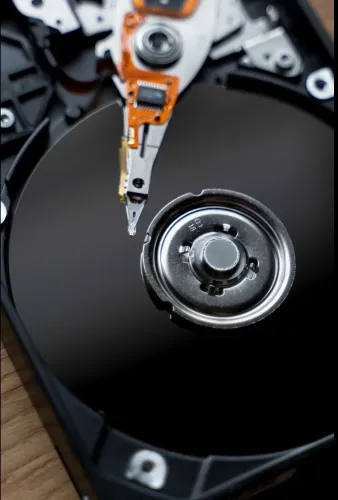
Hard disk drives contain delicate mechanical components, including platters, read/write heads, and motors. Dropping a laptop, knocking an external hard drive, or exposing a drive to excessive vibration can damage these components.
How to avoid it:
Handle HDDs carefully, avoid moving computers while they are operating, and use protective cases when transporting external drives.
2. Overheating
Excessive heat can shorten the lifespan of a hard drive and potentially damage sensitive electronic and mechanical components. Poor ventilation, dust buildup, and high ambient temperatures can contribute to overheating.
How to avoid it:
Maintain proper airflow, clean dust from computer cooling systems, and keep external drives away from direct sunlight and heat sources.
3. Power Surges & Electrical Problems
Unexpected power cuts, voltage fluctuations, and electrical surges can damage a hard drive’s PCB or other internal components. Sudden power loss can also cause file-system corruption.
How to avoid it:
Use a reliable UPS or surge protector, especially for desktop computers, NAS devices, and business servers.
4. Bad Sectors
Bad sectors are damaged areas of a hard drive that can become unreadable. A small number may develop naturally over time, but increasing numbers can indicate a deteriorating drive.
Warning signs include: slow performance, corrupted files, unusual errors, and frequent system crashes.
How to avoid it:
Monitor drive health and replace drives showing consistent deterioration rather than waiting for complete failure.
5. Mechanical Wear & Tear
Traditional HDDs have moving parts that experience wear over time. Motors, bearings, and read/write heads can eventually degrade, particularly in drives subjected to heavy workloads.
How to avoid it:
Monitor older drives, maintain adequate cooling, and proactively replace critical storage devices before they reach the end of their expected service life.
6. File-System Corruption
Improper shutdowns, software crashes, malware, or interrupted write operations can corrupt the file system. In severe cases, the computer may stop recognizing the drive or its partitions.
How to avoid it:
Shut down systems properly, keep operating systems updated, and avoid disconnecting external storage while data is being written.
7. Malware & Ransomware
Not every data-loss incident is caused by physical drive failure. Viruses, ransomware, and other malicious software can encrypt, modify, or delete important files.
How to avoid it:
Use reputable security software, keep systems updated, avoid suspicious downloads, and maintain offline or otherwise isolated backups of important data.
8. Accidental Deletion & Formatting
Human error remains one of the most common causes of data loss. Accidentally deleting files, formatting the wrong partition, or reinstalling an operating system can make important data inaccessible.
How to avoid it:
Double-check before formatting or deleting partitions and maintain multiple backups of important files.
9. Firmware or PCB Failure
Hard drives rely on firmware and electronic circuitry to operate correctly. Firmware corruption or PCB failure can cause symptoms such as drive detection problems, incorrect capacity readings, or complete inaccessibility.
How to avoid it:
There is no simple preventive solution for every electronic or firmware failure. However, regular backups can ensure that a hardware failure does not become permanent data loss.
10. Lack of a Proper Backup Strategy
The biggest mistake is relying on a single hard drive to store important information. Even a seemingly healthy drive can fail without much warning.
How to avoid it:
Follow a 3-2-1 backup strategy: keep at least three copies of important data, on two different types of storage/media, with at least one copy stored separately or offline.
Common Warning Signs of Hard Drive Failure
Recognizing early symptoms can give you an opportunity to secure your data before a complete failure.
Watch for:
- Clicking, grinding, or unusual noises
- Extremely slow file transfers
- Frequent system freezes or crashes
- Files becoming corrupted or inaccessible
- Hard drive disappearing from the operating system
- SMART or disk-health warnings
- Repeated read/write errors
- Unexpected partition or formatting errors
- External HDD disconnecting repeatedly
If a drive is making unusual mechanical noises or repeatedly disconnecting, avoid repeatedly restarting or testing it. Continued operation can potentially worsen physical damage.
What to Do When Your Hard Drive Fails
If your hard drive suddenly becomes inaccessible, the first priority should be protecting the remaining data.
- Stop unnecessary use of the affected drive.
- Do not repeatedly power-cycle a mechanically damaged HDD.
- Never open a hard drive in a normal room environment.
- Avoid using random repair utilities if the data is critical.
- Do not format the drive simply because the computer asks you to.
- Consult professional data recovery experts for an appropriate diagnosis.
Professional data recovery may involve specialized hardware, controlled environments, imaging techniques, or component-level procedures depending on the type of failure.
Why Choose NDR Labs for Data Recovery?
At NDR Labs, our professional data recovery experts understand that every storage failure is different. Whether the problem involves mechanical damage, bad sectors, accidental deletion, file-system corruption, firmware issues, or electronic failure, proper diagnosis is essential before attempting recovery.
Our approach focuses on identifying the failure type, protecting the original storage media, and using an appropriate recovery process to recover accessible data wherever technically possible.
Protect Your Data Before Disaster Strikes
Hard drive failure can happen unexpectedly, but many risks can be reduced through proper handling, temperature management, surge protection, regular monitoring, and—most importantly—reliable backups.
If your HDD has already failed or important files have become inaccessible, avoid experimenting with multiple DIY recovery methods. Professional assessment can help prevent additional damage and determine the most appropriate recovery approach.
NDR Labs — Professional Data Recovery Experts You Can Trust
Frequently Asked Questions:
Q1. What is the most common reason for hard drive failure?
Hard drives can fail due to mechanical wear, physical damage, overheating, bad sectors, electrical problems, firmware issues, and file-system corruption. Human errors such as accidental formatting and deletion can also result in data loss.
Q2. Can a failed hard drive be recovered?
In many cases, data may be recoverable, but the possibility depends on the type and severity of failure. A professional diagnosis is recommended before attempting recovery.
Q3. Should I keep using a failing hard drive?
If the drive contains important data and is showing serious symptoms, continued use can potentially make the situation worse. Stop unnecessary activity and seek professional advice.
Q4. How can I prevent hard drive data loss?
Maintain regular backups, protect drives from physical damage and overheating, use surge protection, monitor drive health, and replace aging drives proactively.
Q5. Can data recovery experts recover data from physically damaged HDDs?
Specialized data recovery laboratories may be able to recover data from certain physically damaged drives using appropriate equipment and techniques. Results depend on the specific failure and condition of the media.
Keywords